
Krira TV
Live sport has quietly moved house. It no longer lives only on the living-room television at a fixed hour, it travels in pockets, plays on trains, and starts whenever the match does. That shift explains the surge of interest in flexible streaming apps, and Krira TV APK has become one of the names Android users search for most when they want matches and channels without a cable contract in the way.
Krira TV is built around a simple promise: open the app on an Android phone or tablet and reach live sports and television broadcasts through an interface that makes sense within seconds. Cricket, football, and international tournaments sit at the centre of that promise, with everyday TV viewing wrapped around them.
The app keeps drawing attention because it respects how fans actually watch, in short bursts and long sessions, at home and away, on the newest flagship and on the phone that has survived three seasons already.
This page is the complete starting point: what Krira TV offers, how the streaming experience feels, which devices it suits, how installation works, what to check for safety, and why so many sports fans keep it on their home screens.
Get the latest Krira TV APK file for your Android phone or tablet.
Enable unknown sources and follow the step-by-step installation guide.
Launch the app and watch live sports, cricket, football, and TV channels.
Table of Contents
Screenshots
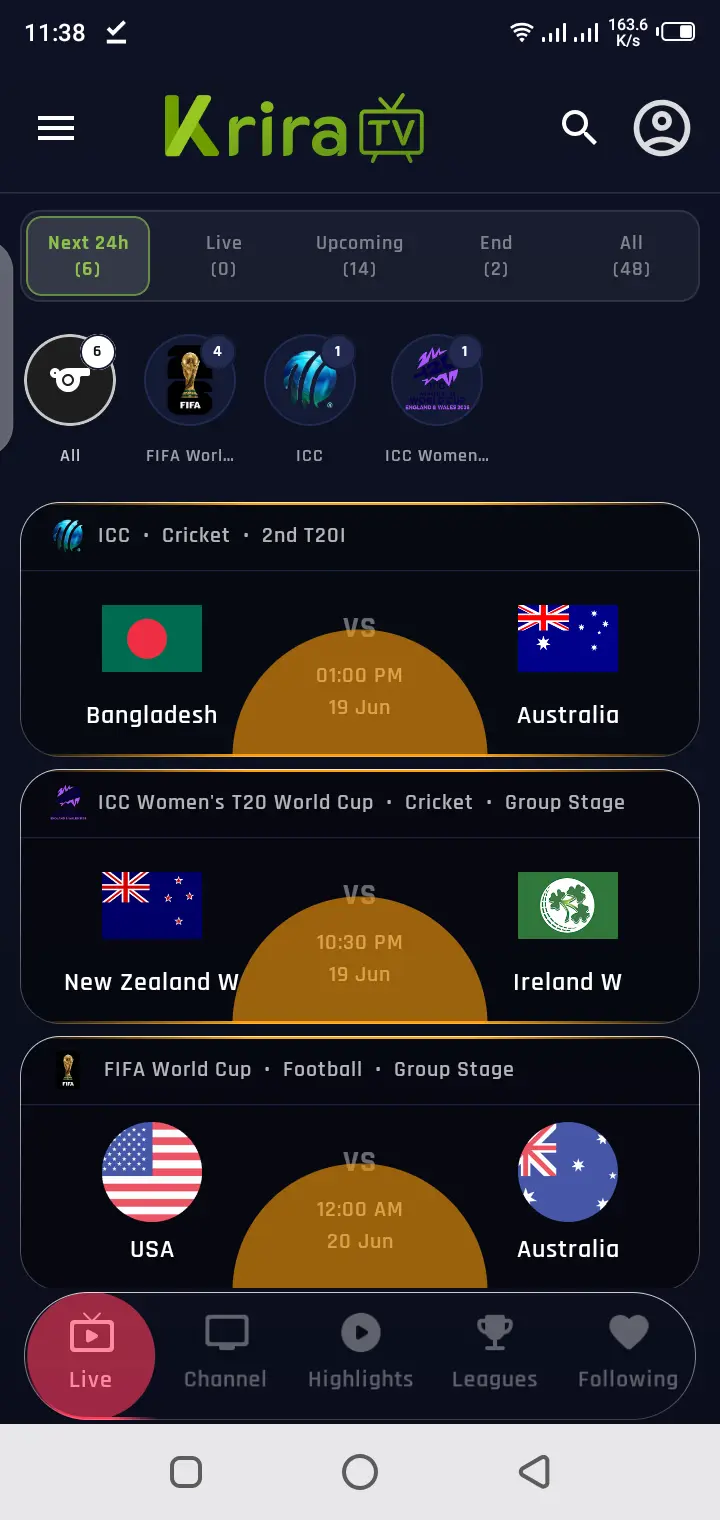
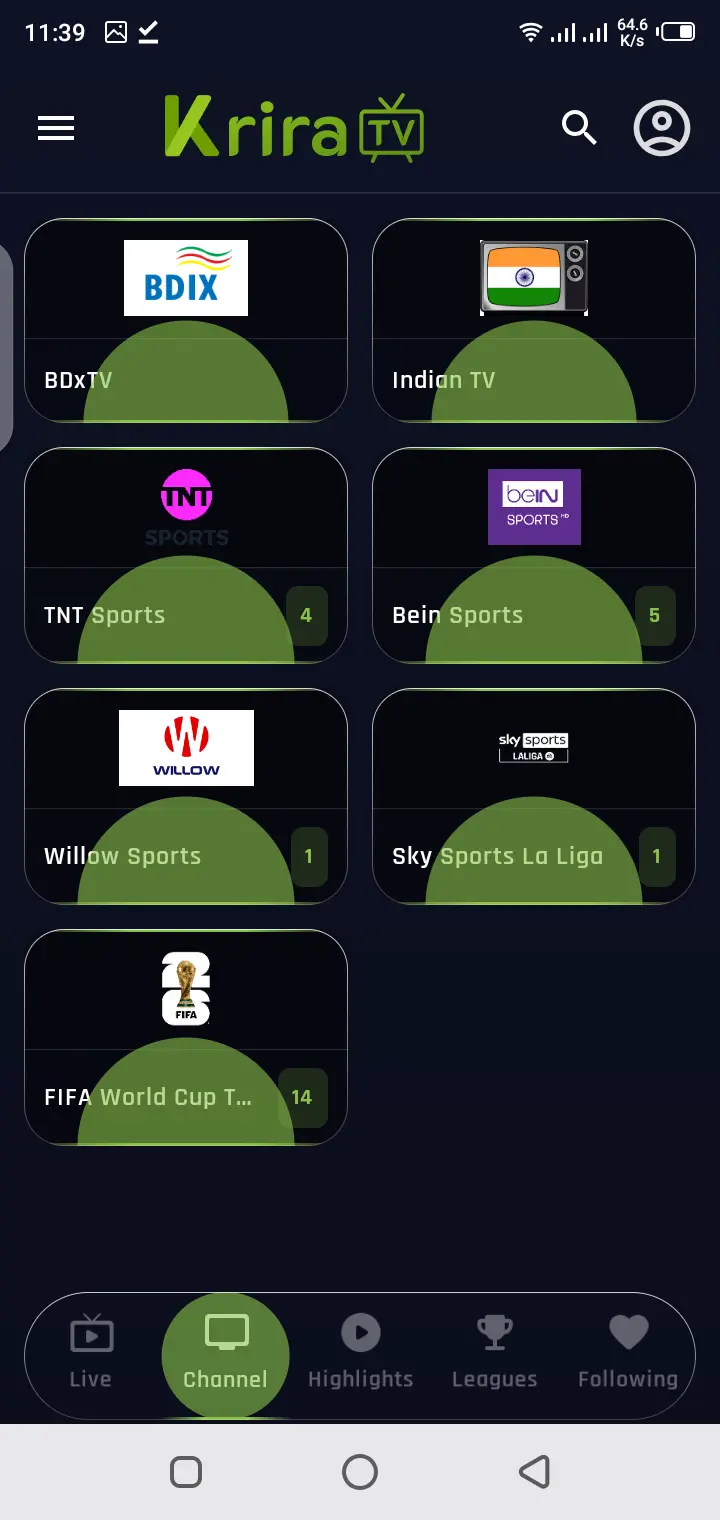
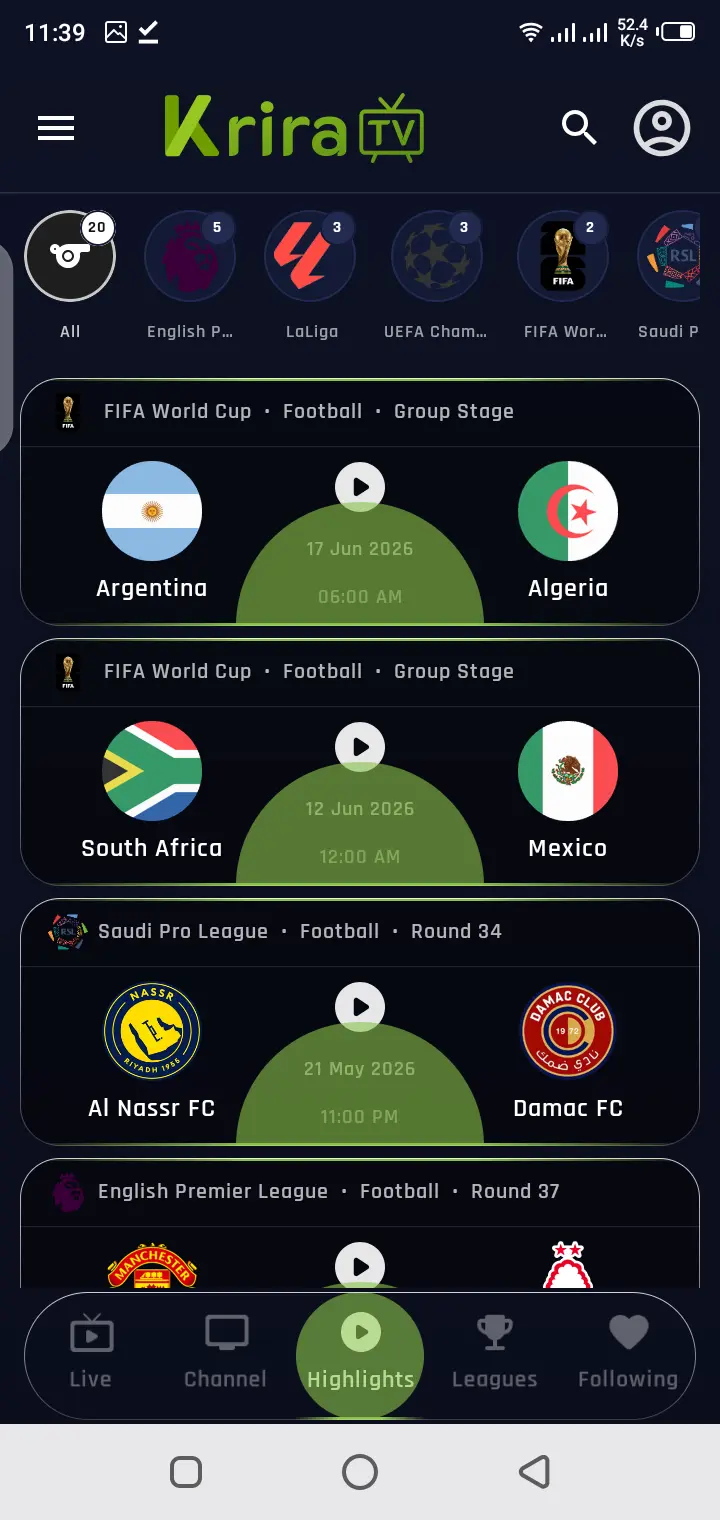
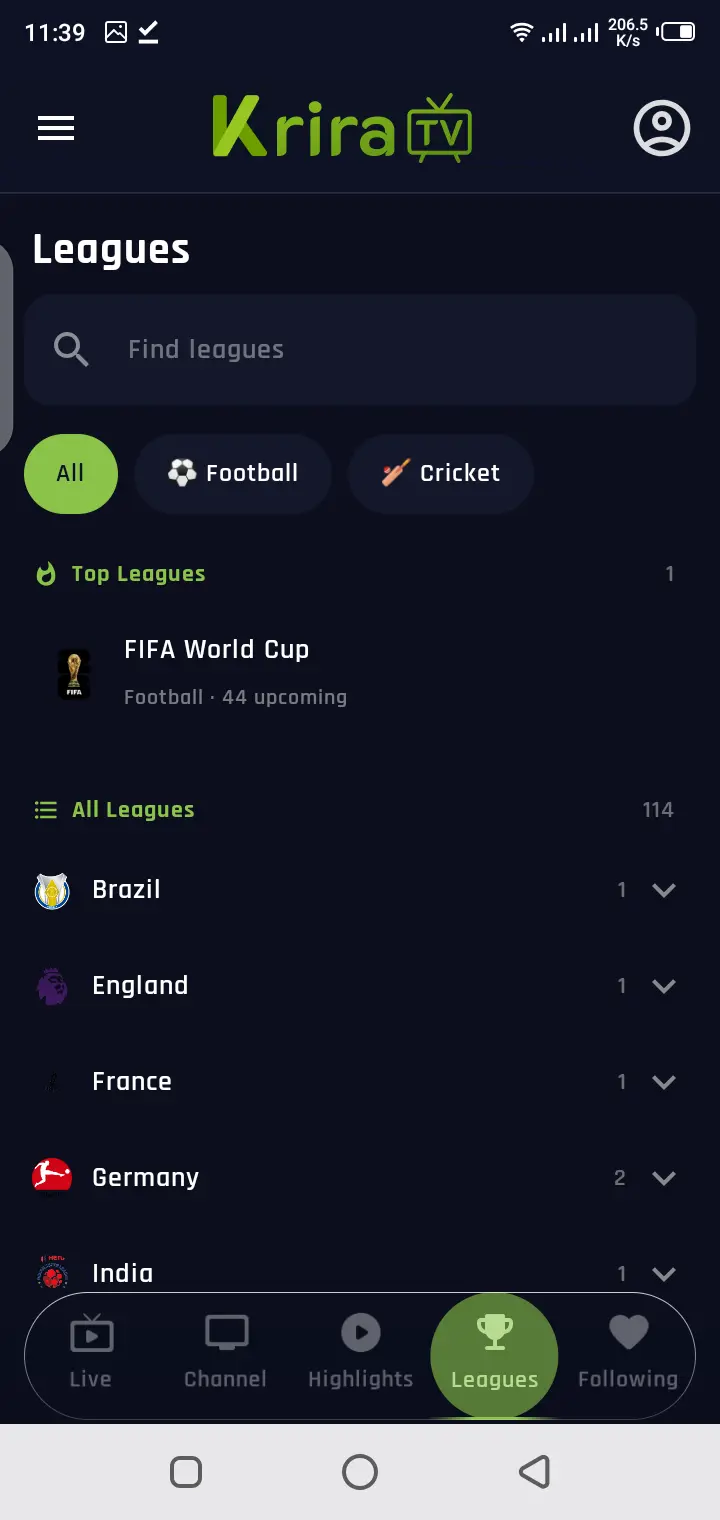
What Is Krira TV APK?
Krira TV APK is an Android streaming application that brings live sports broadcasts and television channels together in one mobile-first place, designed for viewers who would rather open an app than negotiate a traditional TV package.
Instead of relying solely on traditional television services, many viewers prefer applications that provide greater flexibility. Sports fans often want immediate access to ongoing matches regardless of their location.
Krira TV is commonly used by people who want:
The app has gained attention because it brings multiple viewing options into a single application.
Unlike traditional broadcasting methods that depend on fixed viewing locations, streaming apps allow users to stay connected to sporting events wherever they are.
For users who want a complete breakdown of streaming functionality, continue with:
- Live sports coverage
- Mobile streaming convenience
- Easy access to sports channels
- Flexible viewing options
- Entertainment content alongside sports
Why Sports Fans Use the App
Ask regular users why the app earned its place on their phones and the answers rarely start with technology. They start with moments: a wicket seen live on a bus, a derby watched with a father in another city, a final that did not have to be missed.
Several factors contribute to its popularity.
Convenience
One of the biggest advantages of mobile streaming is convenience.
Users can access content through their Android devices without depending entirely on televisions or desktop systems.
This flexibility allows viewers to follow sporting events while:
Convenience remains one of the strongest reasons sports streaming applications continue growing.
- Traveling
- Working
- Commuting
- Spending time away from home
Accessibility
Accessibility plays an important role in user satisfaction.
Viewers generally prefer platforms that make content easy to locate and access.
Complicated systems often create frustration.
Applications with simple navigation and organized content tend to attract more users.
Live Sports Coverage
The ability to watch live events remains one of the primary attractions.
Sports fans often prioritize real-time viewing because live matches create excitement that recorded broadcasts cannot fully replicate.
Live streaming allows viewers to experience:
as events happen.
- Match developments
- Tournament progression
- Competitive moments
- Sporting drama
How the App Works
Behind the simple home screen, Krira TV works the way modern streaming is expected to work: you choose a channel or event, the app requests the stream, and playback begins through your internet connection with quality adjusting to what your network can carry.
Users launch the application, browse available content categories, and select the streams they wish to watch.
The quality of the viewing experience depends on several factors, including:
Because streaming depends heavily on connectivity, maintaining a stable internet connection often improves performance significantly.
Many streaming-related issues are linked to connection quality rather than the application itself.
- Internet stability
- Device performance
- Application version
- Streaming availability
Key Features
An app earns a sports fan's trust through its feature set, and Krira TV's is organised around the viewing itself, finding live content quickly, keeping playback steady, and making repeat visits effortless.
Understanding available features helps determine whether the application meets individual viewing needs.
Live Sports Streaming
Live sports streaming is the core attraction.
Many users install Krira TV specifically to watch sports events through mobile devices.
Sports categories may include different types of competitions depending on content availability.
The ability to follow matches from various locations increases viewing flexibility.
For dedicated sports viewing information, see:
Multiple Content Categories
Sports may be the primary focus, but users often appreciate access to additional content categories.
This helps create a broader entertainment experience within a single application.
Instead of switching between multiple services, viewers can explore various content options from one platform.
Mobile-Friendly Experience
Modern users spend significant time on mobile devices.
Applications that perform well on smartphones often provide a better overall experience.
Mobile streaming allows viewers to stay connected to sports events throughout the day.
Simple Navigation
User experience matters.
Applications with organized menus and intuitive navigation generally create fewer frustrations for viewers.
Simple navigation helps users locate streams more quickly.
Regular Improvements
Applications often receive updates that help improve:
Using the latest version usually provides the best experience.
- Stability
- Performance
- Compatibility
- User experience
Live Sports Streaming Experience
Features matter on a specification list, but fans judge an app in the ninety minutes after kick-off. The live experience on the app is shaped by stream stability, sensible quality adaptation, and how gracefully the app behaves when a big match pulls a big audience.
Sports viewers expect:
Several elements influence streaming quality.
- Smooth playback
- Reliable access
- Minimal interruptions
- Quick loading
Internet Quality
Internet stability directly affects streaming performance.
A weak connection may result in:
Users generally achieve better results through reliable internet access.
- Buffering
- Delays
- Interrupted streams
Device Performance
Device resources also influence streaming quality.
Modern devices often provide:
Performance considerations become increasingly important during extended viewing sessions.
- Better responsiveness
- Faster loading
- Improved playback
Viewing Flexibility
Streaming applications allow users to watch content from different locations.
This flexibility is one of the major reasons mobile streaming continues to grow among sports audiences.
Channels and Content Availability
Content is the other half of the decision, and its channel line-up is organised to serve the way people actually browse: by sport first, by event when it matters, and by familiar channel names the rest of the time.
Viewers want to know what kind of content can be accessed before installation.
Different users have different priorities.
Some focus exclusively on sports.
Others prefer broader entertainment options.
The availability of multiple content categories increases overall usefulness.
Device Compatibility
This streaming app is an Android-first experience, which makes the compatibility question refreshingly concrete: a phone or tablet running a supported Android version, enough storage for the app and its cache, and a connection that can carry video.
Compatibility influences:
Most users access the app through Android devices.
- Performance
- Stability
- Streaming quality
- User experience
Android Smartphones
Android smartphones remain the most common platform.
They provide portability and convenience.
Android Tablets
Larger displays can improve viewing comfort.
Many users prefer tablets when watching extended sports broadcasts.
Android TV Devices
Some users choose larger screens for home viewing.
Android TV support can improve the viewing experience significantly.
For complete compatibility information, continue with:
Watching on Android TV and Smart TV
The phone finds the match, but the television hosts it, which is why so many it users eventually move their viewing to Android TV or a smart TV setup for the fixtures that deserve the big screen and the good speakers.
Users who have Android TV devices often look for ways to enjoy this streaming app on larger displays.
Benefits of larger-screen viewing include:
For many sports enthusiasts, larger displays create a more enjoyable environment for watching live events.
Because sports broadcasts often last several hours, viewing comfort becomes increasingly important.
- Better visibility
- Improved viewing comfort
- Enhanced match experience
- Easier group viewing
How to Download and Install Krira TV APK
Installing the app follows the familiar Android APK route: obtain the file from a source you trust, allow the installation, and open the app. The few minutes of care taken here decide how smooth everything afterwards feels.
A few minutes of preparation can help prevent installation problems later.
Step 1: Verify Device Compatibility
Before downloading the application, users should ensure that their Android device meets the necessary requirements.
Compatibility affects:
For complete information, visit:
- Stability
- Performance
- Streaming quality
Step 2: Download the Latest Version
Using the latest version is generally recommended.
Updated versions often include:
- Bug fixes
- Stability improvements
- Better compatibility
- Enhanced performance
Step 3: Install the Application
After downloading:
Most installations are completed within a few minutes.
- Open the APK file
- Follow installation prompts
- Complete installation
- Launch the application
Step 4: Review Settings
After installation, users should review settings and confirm that streaming functions correctly.
This helps identify potential issues early.
For a complete installation walkthrough, continue with:
Why Keeping the App Updated Matters
Streaming apps improve quietly in the background of their release cycles, playback fixes, compatibility work, small interface repairs, and staying current is the simplest performance habit a it user can keep.
Applications evolve over time.
Developers frequently introduce improvements designed to improve usability and reliability.
Benefits of Updates
Updates may improve:
Ignoring updates can sometimes lead to avoidable issues.
- Application stability
- Compatibility
- Streaming performance
- User experience
Performance Improvements
Performance optimization is one of the most common reasons updates are released.
Users often notice:
- Faster loading
- Better responsiveness
- Reduced buffering
- Improved playback
Compatibility Enhancements
Android devices continue evolving.
Updates help maintain compatibility across newer devices and software versions.
For update information, continue with:
Common Streaming Problems
Every streaming app meets the same family of problems: a stream that will not start, a picture that freezes at the worst moment, sound that wanders off. What matters is that nearly all of them have ordinary causes and patient fixes.
Understanding these issues helps reduce frustration.
The most common problems include:
Fortunately, many of these problems can be solved through simple troubleshooting.
- Buffering
- Loading delays
- App crashes
- Playback interruptions
- Connectivity issues
Slow Loading
Slow loading often occurs because of:
Restarting the application and checking connectivity often improves results.
- Weak internet connections
- Network congestion
- Device limitations
Playback Interruptions
Interrupted streams can occur when internet stability decreases.
Reliable internet access usually improves viewing quality.
App Stability Issues
Occasional crashes may occur due to:
Keeping the application updated helps reduce these risks.
For detailed troubleshooting, visit:
- Outdated versions
- Limited storage
- Device compatibility problems
Buffering and Streaming Performance
Buffering is the tax unstable connections charge live sport, and it is rarely random. Understanding what triggers it, network dips, peak-hour congestion, a device working too hard, turns a mysterious frustration into a checklist.
While occasional buffering can occur on any platform, frequent interruptions usually indicate underlying issues.
Causes of Buffering
Common causes include:
- Slow internet speeds
- Unstable connections
- Network congestion
- Device performance limitations
How to Improve Streaming Quality
Users can often improve performance by:
Small improvements can significantly enhance viewing quality.
- Using stable internet connections
- Closing unnecessary background applications
- Restarting devices
- Updating the application
Is It Safe to Use?
Safety deserves a straight answer rather than a slogan: an APK's trustworthiness comes from where the file came from, what the device reports about it, and the habits of the person who installed it.
Before installing any application, users should verify information and review available details carefully.
Responsible downloading practices improve both security and stability.
Recommended Safety Practices
Users should:
These simple precautions reduce risks significantly.
- Verify sources
- Use updated versions
- Review permissions
- Avoid suspicious modifications
- Check compatibility information
Why Verification Matters
Reliable information helps users make informed decisions.
Verification becomes especially important when installing APK files.
Why Sports Fans Keep Coming Back
Loyalty in streaming is re-earned every matchday, and this streaming app keeps earning it the unglamorous way, by being open, loaded, and playing when the anthem starts, season after season.
Instead, it comes from a combination of convenience, accessibility, and sports-focused functionality.
Several factors contribute to continued user interest.
Flexible Viewing
Users appreciate being able to watch content from different locations.
Sports-Centered Experience
Sports remain the primary attraction.
Many viewers install the app specifically for match coverage.
Mobile Convenience
Mobile accessibility helps users stay connected throughout the day.
Easy Navigation
Simple interfaces often improve the overall user experience.
These advantages help explain why sports fans continue searching for the app information.
For a deeper discussion, continue with:
How It Compares With Other Sports Streaming Apps
No single app wins every comparison, and honest viewers choose by their own priorities: the sports they follow, the devices they own, and the viewing habits they actually keep rather than the ones they intend to.
As a result, users often compare multiple options before making a decision.
Common comparison factors include:
Each platform offers different strengths.
Understanding these differences helps users choose the option that best fits their viewing preferences.
- Content availability
- Streaming quality
- Device support
- Ease of use
Pros and Cons
A fair verdict needs both columns. its strengths are the ones sports fans feel weekly, and its limitations are the honest kind, shared by most streaming apps and manageable with the habits this page describes.
Understanding both sides helps users make informed decisions.
Pros
- Sports-Focused Experience: The application appeals directly to sports audiences.
- Mobile Accessibility: Users can access content from various locations.
- Multiple Content Categories: Different viewing options increase flexibility.
- User-Friendly Interface: Simple navigation improves usability.
- Convenient Viewing: Quick access to content saves time.
Cons
- Internet Dependence: Streaming quality depends heavily on connection stability.
- Device Performance Variations: Performance may differ between devices.
- Content Availability Changes: Available content may vary over time.
- Streaming Quality Depends on Multiple Factors: Network conditions significantly affect performance.
The Complete Knowledge Hub
One guide is never the whole story, so this site organises everything it knows about this streaming app into a proper knowledge hub: installation, channels, troubleshooting, devices, and the questions fans actually ask.
Whether users want:
they can find dedicated resources throughout the site.
Each article expands a specific topic while connecting naturally to related information.
This structure creates a better user experience and helps visitors find answers without repeatedly searching elsewhere.
- Installation guidance
- Sports streaming information
- Device compatibility
- Update details
- Troubleshooting help
- Safety information
- Alternative platforms
Why This Website Covers More Than Download Information
A download button can be copied anywhere. What cannot be copied is the work around it, the checking, the updating, and the guides written from the questions real users send in.
However, users often need more than a download link.
After installation, they frequently ask:
Providing answers to these questions creates a more useful resource for users.
It also helps visitors continue learning after installation.
- How does the app work?
- Why is streaming buffering?
- Which devices are supported?
- Is the app safe?
- How can performance be improved?
- What content is available?
Frequently Asked Questions
The app is a sports streaming application for Android that brings live sports broadcasts and television channels into one mobile-friendly app.
It is used mainly by fans who want flexible access to matches and TV content on phones and tablets, without depending entirely on traditional television services.
For a complete overview, visit: it Features and Live Streaming Guide.
Yes, live sports coverage is the heart of what this streaming app is for.
Cricket, football, and major tournaments are the events most users open the app for, alongside regular television channels for everyday viewing.
The channels and sports guides on this site explain what to expect from the line-up in more detail.
For detailed viewing information, continue with: How to Watch Live Sports on the app.
It is commonly used as a free streaming option, which is a large part of why it attracts so much searching and discussion.
Because availability and terms can change, treat any claim about cost the way you would on any app: check what the current version itself presents.
Yes. This streaming app can be set up on Android TV and compatible smart TV devices, which is how many fans move matches from the phone to the biggest screen in the house.
The setup differs slightly from a phone install, and the Android TV guide on this site walks through the television route in full.
For detailed information, visit: the app for Android TV and Smart TV.
Buffering usually means the stream is not receiving data fast enough, most often because of an unstable connection, peak-hour congestion, or a device under load from other apps.
The encouraging part is that buffering responds to method: a steadier connection, a calmer device, and a sensible quality choice fix the majority of cases.
Complete solutions are covered in the app Buffering and Streaming Problems Fix guide.
- Internet stability
- Network congestion
- Device performance
- Streaming conditions
Start with the calm sequence: close and reopen the app, restart the device, and test your connection with another stream to see whether the problem is the app or the network.
If the fault persists, work through the checks in the troubleshooting guide rather than changing settings at random.
For detailed troubleshooting, read: this streaming app App Not Working? Common Fixes.
- Restarting the application
- Updating the app
- Checking internet connectivity
- Verifying device compatibility
its safety depends chiefly on where the APK file came from and how carefully it was installed, the same rule that governs every Android app obtained as a file.
Obtained carefully and kept updated, it is used confidently by large numbers of sports fans; obtained carelessly, no app deserves your trust.
For complete information, visit: Is it Safe to Use?.
Updating means installing the newer APK version over the existing one, which normally preserves your setup in the usual Android way.
Keeping the app current is the easiest performance and compatibility habit available to you.
Additional information is covered in the How to Update this streaming app guide.
- Performance
- Stability
- Compatibility
- User experience
The app is designed for Android phones and tablets, and it can also be set up on Android TV, compatible smart TVs, and Firestick devices.
A PC or laptop joins the list through an Android emulator, which makes the app comfortable on almost any screen a household owns.
For complete requirements, continue with: it System Requirements.
- Android smartphones
- Android tablets
- Android TV devices
Yes, the sports streaming category is crowded, and the right alternative depends on the sports you follow and the devices you own.
Some viewers keep two apps installed for different competitions, which is a perfectly sensible way to cover a season.
Our alternatives guide compares the realistic options honestly so you can choose by your own priorities.
For comparisons, read: this streaming app vs Other Sports Streaming Apps and Best Alternatives to the app.
Conclusion
It keeps winning sports fans for a practical reason: it puts live matches and television channels within a couple of taps on the Android devices people already own, and it does so without demanding new hardware or a new contract.
The experience improves further when the basics are respected, a version kept current, a connection given a fair chance, and a device that meets the requirements this page sets out. None of that is complicated, and all of it is within any viewer's control.
Start with the download, follow the installation guidance, and keep the guides bookmarked for the day something misbehaves. The match, as always, is the point, everything here exists to get you to it calmly.
Download APK